# FAQ
My Withings app doesn't share/show step count?
Make sure you have shared your health data in the Withings app. \
1\. Open Withings app\
2\. In the navigation bar click 'Share'\
3\. scroll down to see connected apps\
4\. Choose your wallet native app (iOS= Apple Health, Android= Health Connect)\
5\. Click the app for your device and check all is approved to be shared.
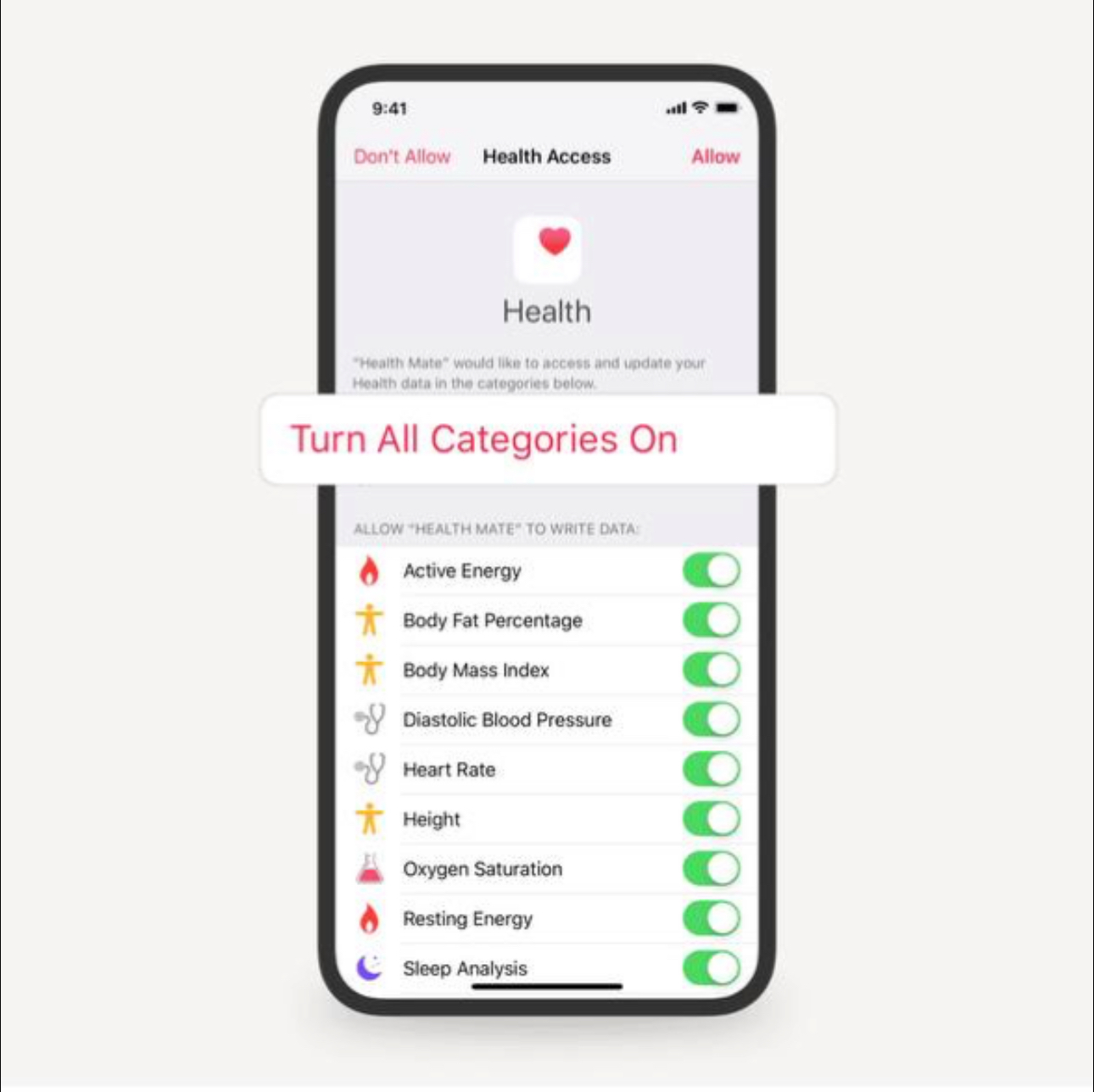
**Iphone: Iphone Settings - Privacy - Health - Withings app - turn all categories on. (force close and open Withings and check if you see your steps)**
 **Android: Withings app - navigation bar 'Share' - scroll down - choose Health Connect - 'activate' and turn on all categories to allow Withings to import and export all health data - Force close Withings and open again to see it updated.**\
\
**If the issue with Health Connect remains - it could be your device is not compactible with health connect - download samsung health and follow the same points here above.**\

**Android: Withings app - navigation bar 'Share' - scroll down - choose Health Connect - 'activate' and turn on all categories to allow Withings to import and export all health data - Force close Withings and open again to see it updated.**\
\
**If the issue with Health Connect remains - it could be your device is not compactible with health connect - download samsung health and follow the same points here above.**\

Do I need to buy extra devices?
No. You can start with only as much as your smartphone. All smartphones have a stepcounter built in. We extract the data through withings and bring the steps into ST3PR!
If you have or will have in the future a smartwatch or other devices which are compactible with your smartphone, the smartphone will grab the steps from that device which withings will extract and bring again to ST3PR.
I get 'Access denied' when connecting Withings to ST3PR?
Google doesnt accept the google login from within VeWorld.\
Login with emailadres instead of choosing 'google login'.
No step update last 48 hours on ST3PR?
To keep your steps updated and make sure they count towards your rewards, be sure to open the Withings regularly and pull down to resfresh!\
\
You need to see your amount of steps in Withings as well. If you dont see this, go to the FAQ 'My withings app doenst share/show step count?'.
What does ST3PR Calculate when I claim?
ST3PR rewards are claimable for up to the last 7 days (starting from the first day you connected with the DApp).
You can choose to claim daily for yesterday’s steps, or wait and claim weekly for the past 7 days. This flexibility lets you collect rewards at your convenience!
Withings shows a different amount of steps
Withings updates every 15 mins. This can cause a deviation in amount of steps counted.
Does it work on threadmills?
Yes. We take currently only the amount of steps into account. No location data. All steps that are made are counted.
What is the benefit of holding a Corgi NFT / vet.domains name?
[Check out our earning possibilities here](https://st3pr.gitbook.io/st3pr/basics)\
\
Check out how tho get a [corgi nft here](https://st3pr.gitbook.io/st3pr/basics/markdown-2) and how to get a [vet domains name here](https://st3pr.gitbook.io/st3pr/basics/markdown-1)
I just connected with ST3PR for the first time and it doenst show steps?
When you connect to ST3PR for the first time, the app starts tracking your steps from that day onward. ST3PR calculates rewards based on past days, usually going back up to 7 days—but only for days after you first connected. This means you won’t see rewards for steps taken before your initial connection. Keep stepping, and rewards will start appearing soon!
The step count is different between the Apple Watch, Apple Health, and Withings App
The Withings App and Apple Health use different algorithms to calculate the number of steps. The number of steps indicated by the Withings App and Apple Health may therefore be different. To provide a step count as accurate as possible, Withings App gathers step data in this order: Withings trackers, Apple Watch, iPhone, and then steps exported to Apple Health by other apps.